

I’ve written a lot of software and hardware recommendations all over the web for the last 15+ years. But what do I actually use every day? Good question!
I enjoy reading Paul Thurrott’s “what I use” pieces, and I wanted to lay out what I personally use, too. I’ve had a lot of reader requests for this one!
So let’s get to it. But first...
The reality of writing about tech
When people ask what I use, they’re often looking for some surprising off-the-beaten path recommendations. But I’m not using a $5000 top-of-the-line laptop and an obscure collection of little-known software every day.
The things I use aren’t necessarily the best — they’re the things I choose to use. There are better laptops than the one I’m typing this on right now! But this laptop is mine.
I’d love to tell you how heavily I customize all my Windows PCs with Windhawk, or about my obscure Linux setup using a tiling window manager you’ve never heard of. But, over the years, I’m customizing Windows less and less. I want to know what normal PC users see. I want to know how Windows feels out of the box.
Sometimes, I tell people how to turn off the ads in Windows — but I don’t turn them off on my own PCs. I leave them on just so I can see what happens. How much will Microsoft fill my Start menu with junk? Will I wake up one day and find a Candy Crush shortcut? I need to know! I’m my own Guinea pig.
So, without further adieu, let’s get right to it:
PC hardware
I use both a desktop PC and a laptop. My desktop PC is powerful and my laptop is portable. It’s a good setup.
I use a Surface Laptop with a Qualcomm Snapdragon X Plus chip and 16 GB of RAM as my main PC. This is the original $999 model that Microsoft discontinued. I get great battery life and good desktop performance on the go.
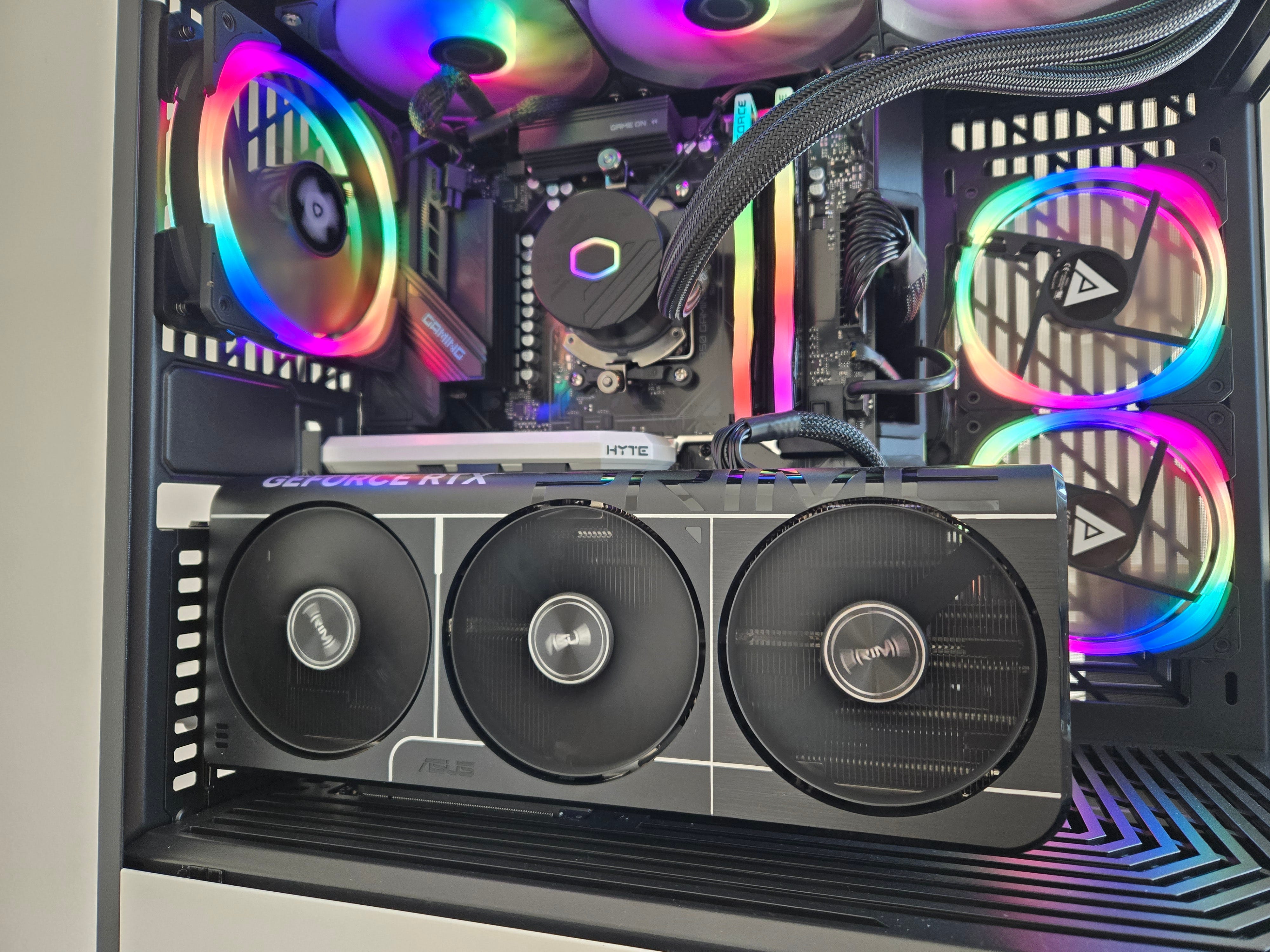
At my desk, I have a gaming PC with an AMD Ryzen 9 9900X CPU and an Nvidia GeForce RTX 5080 GPU. That GPU is essential for experimenting with local AI tools.
I use a Samsung Odyssey G80SD monitor. It’s an OLED panel, but it’s matte rathe than glossy. That’s hard to find, and it helps deal with the sunlight that comes in through the windows — while offering a nice OLED panel. I think it’s a great compromise.
I use a mechanical keyboard at my desk, too — I enjoy the typing action on a mechanical keyboard. Right now, I’m using a Glorious GMMK keyboard right now, but I know those are controversial! I found it on sale for a screaming good deal and couldn’t resist.
I’ve got a lot of other hardware lying around, too: A Steam Deck, Raspberry Pi, Chromebook, and various other laptops, including a Windows 10 laptop when I need to test something on Windows 10.
In my living room, I have a PC hooked up to my TV — and while I have a Chromecast and Roku TV, I love being able to use a PC on
Windows software
Windows 11 is my main desktop operating system, of course. I use the Brave browser as my main browser, although I also use Chrome — I have both of them pinned to my taskbar right now. 1Password is my preferred password manager.
For productivity apps, I stick with the Microsoft 365 apps: I use OneNote, Word, and Excel quite a bit. I have a Microsoft 365 subscription, and I store files in the 1TB cloud storage that comes with Microsoft 365. Microsoft To Do is also an excellent task management and grocery-list-tracking app for me. (I’ve been putting off diving into Obsidian for note taking!)
For communications, however, I prefer Google’s apps. I use Gmail and Google Calendar rather than Outlook. I find myself participating in Slack and Google Chat conversations and rarely use Microsoft Teams.
My image-editing needs are basic, and I still use Paint.NET to this day. It’s the image-editing tool I started out working with when I began writing online. (I once paid for Photoshop, but I found it overkill for my needs.) And, these days, I find the Snipping Tool built into Windows 11 works well for screenshots and screen capture.
Spotify is my preferred music-streaming service — I’m a big fan of the live show recommendations based on recent listening. They get me out of the house and nudge me to events I would have missed. I still love VLC for playing local video files. And I prefer buying PC games on Steam when I have time for them.
As far as customizing Windows, I try to keep things lightweight so I’m having an experience like the one most people have. I like Stardock’s Start11 for a better Start menu and the free ExplorerPatcher app for taskbar tweaking, and I’ve used both on and off and would recommend them. I’m also a huge fan of Microsoft PowerToys.
As I’ve mentioned, I have a hard time recommending Windows apps these days for security reasons.
Phones and other mobile gadgets
I use a Samsung Galaxy Z6 Fold as my main phone. (I got it for half off!) I’m a huge fan of the foldable phone experience — I don’t use a tablet. Instead, I can fold out my phone for a larger screen, anywhere. I think foldables will be big in the future. This particular model is getting a little long in the tooth — it’s not the latest one — but it still works well for me. I’ve also got an older iPhone and Google Pixel phone around here somewhere.
For phone service, I use US Mobile. It’s met my needs, and it’s a much better value than T-Mobile, which I used before.
I’ve gone back and forth between wearing smartwatches and a classic analog watch. Right now, the analog watch is winning.
For books, my favorite eReader is a Kindle Paperwhite — but I don’t use it much. I’m really enjoying reading books printed on traditional paper these days. It’s a good break from using electronics all day for work!
Smart Home tech
I’ve been pretty restrained on smart home gear. I’m a fan of smart thermostats: I use Ecobee hardware with wireless SmartSensors to better measure the temperature elsewhere in my home — not just at the thermostat itself. I’m convinced smart thermostats save me real money on heating and cooling thanks to features like automatically adjusting the temperature when no one is home.
I was using Arlo cameras to keep an eye on package deliveries and other things going on outside, but with the huge subscription price increases, I’m in the middle of attempting a switch to Eufy cameras. (I know there are some concerns about this brand, but I’m not super concerned about someone seeing a live feed of my driveway in a worst-case scenario.)
I’ve dabbled with a lot of other smart home gadgets — from lights to radon detectors to bird feeders — but smart thermostats and security cameras are my most important gadgets. I don’t use smart speakers these days. (However, I’m using a first-generation Google Home speaker as a wireless Bluetooth speaker — microphone muted.)
What else do I use? Feel free to ask!
While these are the hardware devices and software tools I find myself using all the time at the start of 2026, they’re of course just a few of the things I’ve used over the years.
If you’re interested in what else I’ve used or you want any recommendations, just ask in the comments below! I’ll try to get you a useful answer from my experience.
This week’s latest from Thurrott.com
But before we get to the comments, let’s talk about what’s new on Thurrott.com.
Microsoft is reportedly working on letting Windows 11 users move the taskbar — that’s huge news! When Microsoft removed this feature at the launch of Windows 11, people spent years asking for it — and Microsoft ignored the feedback. It’s a very visible change of Microsoft’s attitude towards feedback around Windows.
Meanwhile, Windows 11 now has a command-line interface for the Store. And Windows 11’s 26H1 update is looking confusing.
But, for paid Thurrott Premium subscribers, my favorite piece this week was Paul’s look at Microsoft’s shift in attitude toward Windows. There’s change in the air — and it’s looking promising.
⬇️ Okay — now feel free to ask any questions you have! I’ll try to recommend good, useful tech.
I like what you said about sticking closer to the basic Windows experience. Way back when I used to use a lot of custom stuff, for example, I loved Norton Desktop and used it to replace the Windows desktop. In the long run though, it's simpler to keep things clean and less complex.
I do have some favorite tweaks; the first thing I do with Windows is turn off "Hide extensions for known file types" and turn on "Show hidden files, folders, and drives".
Chris: you sound like my doppelganger...I don't do games, so no game machine. I have 2 ASUS Zenbook laptops; main one in my little corner of the bedroom (my 'man cave'?) and a 10 year old Zenbook in the living room for Chromecast (Ubuntu). I have a 32" Samsung TV as my 2nd monitor in the man cave.
8 months ago I got pissed off at MS and made the switch to Ubuntu Linux...I just love it. I have a single legacy app for Windows/Java that was written for me to manage my insulin injection locations (made a motorcycle racetrack around my torso, aptly called TORSO, cause I'm nuts for MotoGP), so I still need Win11!@! I installed Vmware Workstation, with a Win11 virtual machine just for this. But it also gives me a play ground for testing other OSes. Like Zorin...
I have an Alexa setup for lights and fans primarily, cause I like that I can just shout over my shoulder at her...works great.
I like your attitude and the content you provide (will you ever do a Linux column?). I just signed up to support you for a year. Keep up the great work.
Bruce Jamieson
Coquitlam BC Canada