

Have you gotten Windows 11’s new Start menu yet? It’s been rolling out slowly.
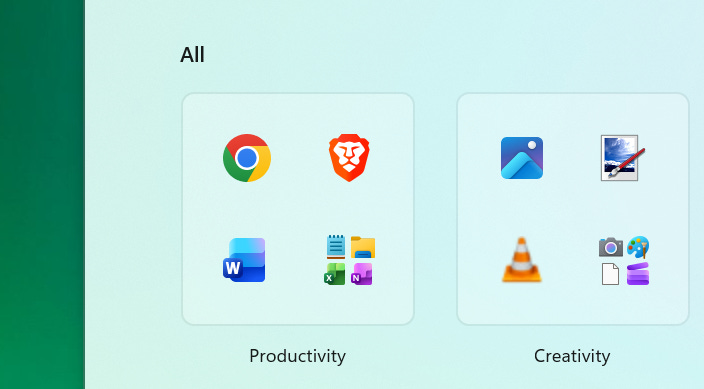
One day, I opened it up and saw a “category” system that looked straight out of a smartphone’s application menu. Now, I can dig through “Other” to find random applications.
I don’t think most people want this. So let’s see how to clean things up — and figure out how we got into this mess. (Spoiler: Once again, it all goes back to Windows 8.)
What do we use a Start menu for?
Personally, I rarely use my Start menu — except as an application launcher with my keyboard. The applications I frequently use are pinned to my taskbar. When I want to launch another application, I press the Windows key, type its name, and press Enter.
I almost never need to dig through the Start menu. When I do, I probably want to see a complete list of the applications installed on my PC.
Back when Microsoft launched Windows 95 with the famous “Start Me Up” campaign, the Start button was the single place you went to do anything on your PC. And you navigated it with your mouse.
The Start menu transformed with Windows Vista, gaining a built-in search box. Now you could click Start or just press the Windows key and start typing to launch anything. And the Start menu hasn’t been the same since.
So what’s the point of a clickable menu in a world where the best way to launch applications is by typing?
Windows 8 solved this problem, but then Microsoft panicked
Here’s the funny thing: Microsoft had a solution back in Windows 8. The company realized that the classic Start menu wasn’t super important anymore. Instead, people needed:
An application launcher that functioned as a widget system. (Live tiles were before their time!)
A keyboard-centric search system to launch applications.
A browsable full list of installed applications.
Windows 8’s Start screen delivered all those features.
Of course, Windows 8 also did a terrible job of adapting the interface to traditional desktop PCs. After Windows 8’s release, Microsoft began years of backpeddling on its vision for Windows.
Microsoft doesn’t know what the Start menu is supposed to be
Windows 10 had a Start menu that made sense, actually: A full list of apps and informational widgets in the form of live tiles. It was obvious what the Start menu was supposed to be.
Now, with live tiles gone — and widgets banished to the viral story-filled Widgets pane that most Windows users wisely try to avoid — Microsoft isn’t really sure what to do with the Start menu.
Beyond searching for apps, what are people supposed to do with this thing?
For the people who are browsing apps, Microsoft now defaults the start menu to a “category” view — likely to be more approachable to people who are more familiar with mobile platforms.
You can clean it up in a few clicks
Windows 11’s Start menu is still easily fixable if you want something more minimal. Here’s what I do:
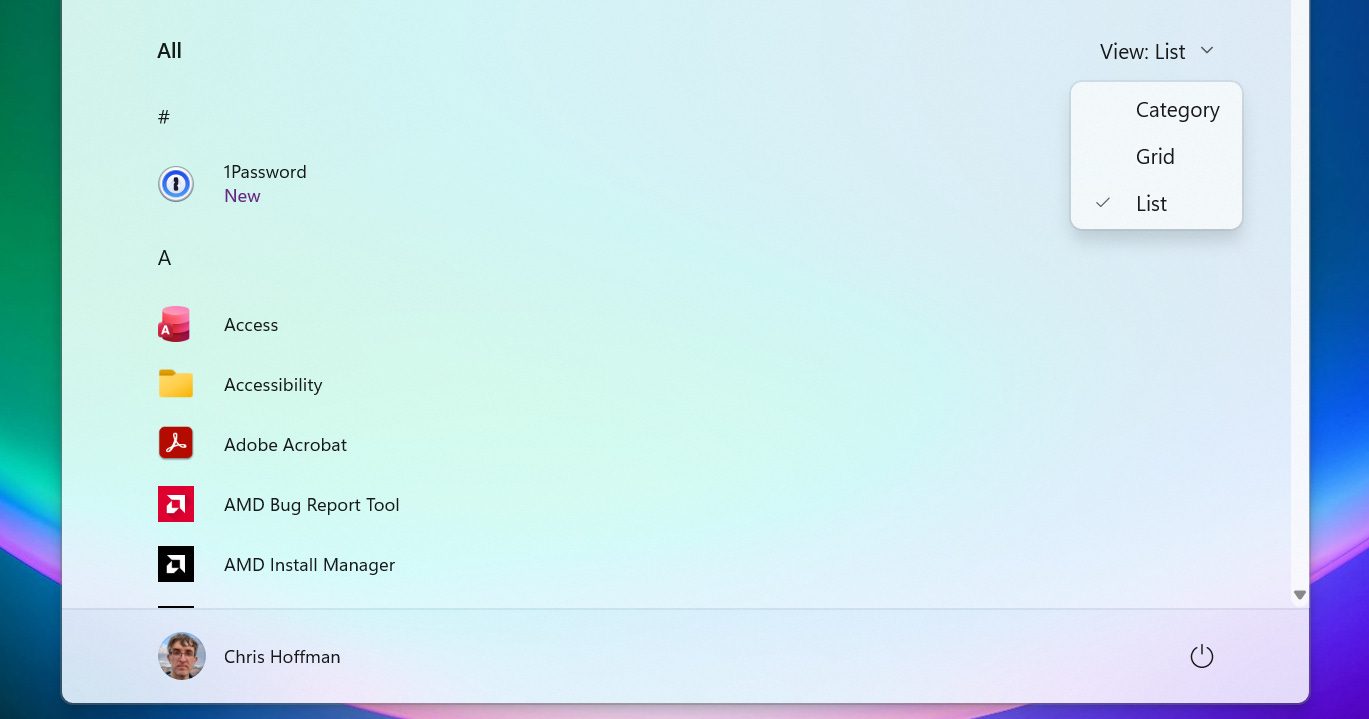
Open the Start menu, click “View” to the right of All Apps, and select “List.”
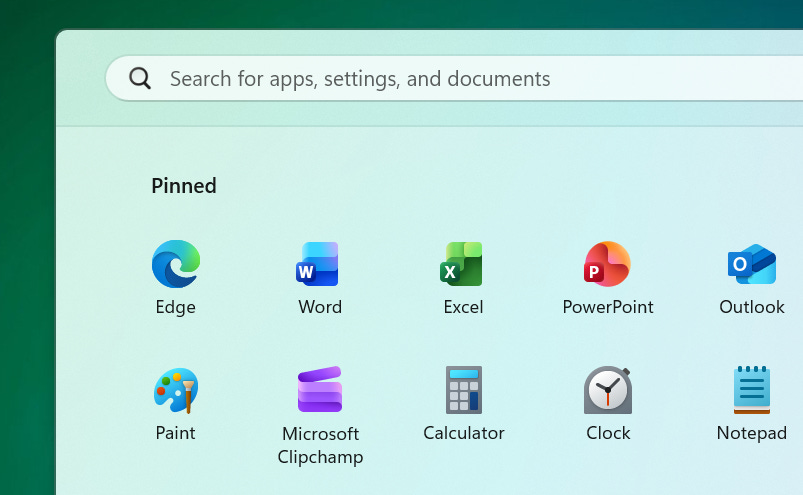
Make apps you use frequently more accessible by right-clicking them and selecting “Pin to Start.”
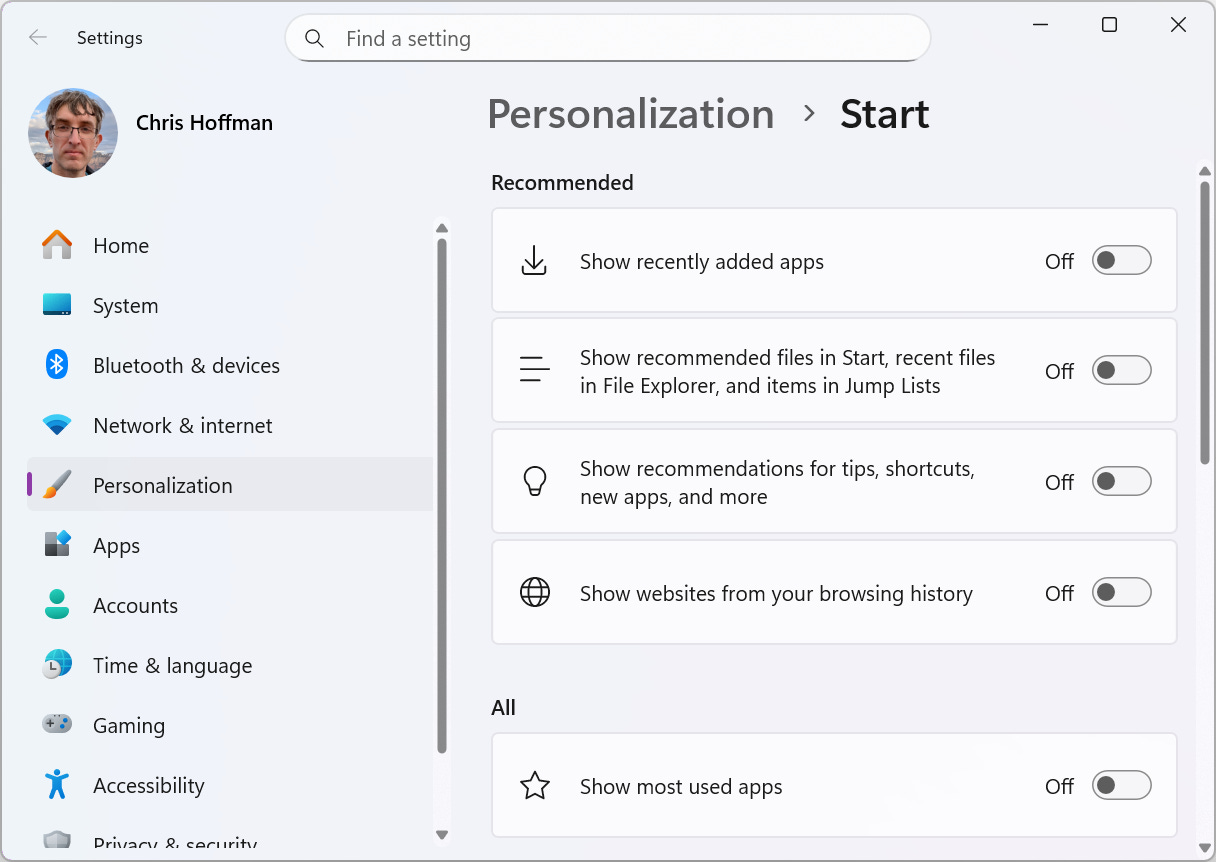
Head to Settings > Personalization > Start and turn off things you don’t want to see, like recently added apps, recommendations, and most used apps.
Done! Your Start menu is now cleaned up. Except… Wait, are you actually using the Start menu to launch applications very often?
I rarely do. In fact, even if I leave my the Start menu in its messy default state, that’s probably fine. If you just use the Start menu as a search tool, I won’t even notice what’s going on in there.
And, let’s be honest, if you do frequently use the Start menu and want something more powerful and flexible, there’s a good chance you’ve turned to a tool like Stardock’s Start11.
The Start menu isn’t even the best option for a keyboard launcher — it’s just the one that’s built into Windows. Microsoft’s own PowerToys Command Palette and PowerToys Run launchers are better. And, unlike the Start menu, they actually respect your default web browser and search engine choices.
Live tiles would be awesome right now
With the Windows Start menu losing steam and not offering many useful features, it seems like Microsoft could re-imagine it to be more useful.
Just imagine it: A Start menu full of useful information. Picture clicking the Start menu and seeing useful information — emails, weather, notifications, and other helpful details. The Start menu could be an informational dashboard, and those widgets could launch applications.
Oops: I just described live tiles. We had that experience in Windows 10’s Start menu. And they failed. Windows 11 abandoned live tiles.
There are lots of reasons live tiles failed: For one thing, they were closely tied to Microsoft’s “modern” UWP application framework. Originally, there was no good way for traditional desktop applications to take advantage of them. Even when Microsoft opened things up, the damage was done. I can’t remember a single traditional desktop app that took advantage of them.
Microsoft doesn’t have to bring back live tiles, but it should be thinking bigger. For now, we’re just getting a Start menu designed to look like a smartphone app launcher. That’s not very compelling.
But hey, maybe I’m wrong! You tell me:
Let’s see how many readers agree with me!
The latest from Thurrott.com
Paul Thurrott’s new book, De-Enshittify Windows 11, is now available for purchase. It’ll be free for Thurrott Premium subscribers.
The big news of the week is about Xbox, with Microsoft Gaming CEO Phil Spencer and Xbox President Sarah Bond leaving the company, replaced Asha Sharma, who has a background in AI. There’s some news about that recent reorganization.
Sharma is talking about the “return of Xbox,“ but Seamus Blackley — one of the cofounders of the original Xbox console — argues she’s going to preside over the end of Xbox.
And now, that’s it for this week. I’ll see you next week!
The Windows start menu hardly ever works right when trying to access applications via the keyboard. Luckily my file-manager of choice is called Directory Opus. This application can be altered to have your most used applications inside its layout.
So, Directory Opus, the browser Vivaldi, the mail client ThunderBird and application LM Studio are pinned in my taskbar. After a reboot, I have my Windows system working how I like it with 4 clicks or so. So very little Start menu use. Very little working with the Windows 11 interface in general actually. Directory Opus (with my personal layout) more than meets my needs.
Too bad it costs 85 Australian dollars. For me, that is price I happily pay to get rid of the Microsoft shenanigans as much as possible. But I have no trouble imagining that this is a rather steep price for many.
Anyway, once Directory Opus is open, I have everything in "mousing distance and I can configure my own keyboard mappings to open whatever I want too. Best of both worlds.
I recently started using Raycast as a Start menu, but PowerToys options are great too.